UI / UX Design
B2B Internal CMS Scheduler
Designed an internal CMS feature that lets stakeholders easily schedule and manage pages, boosting operational efficiency across global teams.
Year :
2024
Industry :
Entertainment
Client :
Ticketmaster
Project Duration :
1 month
Team:
Designer (Me) , 3 Developers , 2 Ideated with
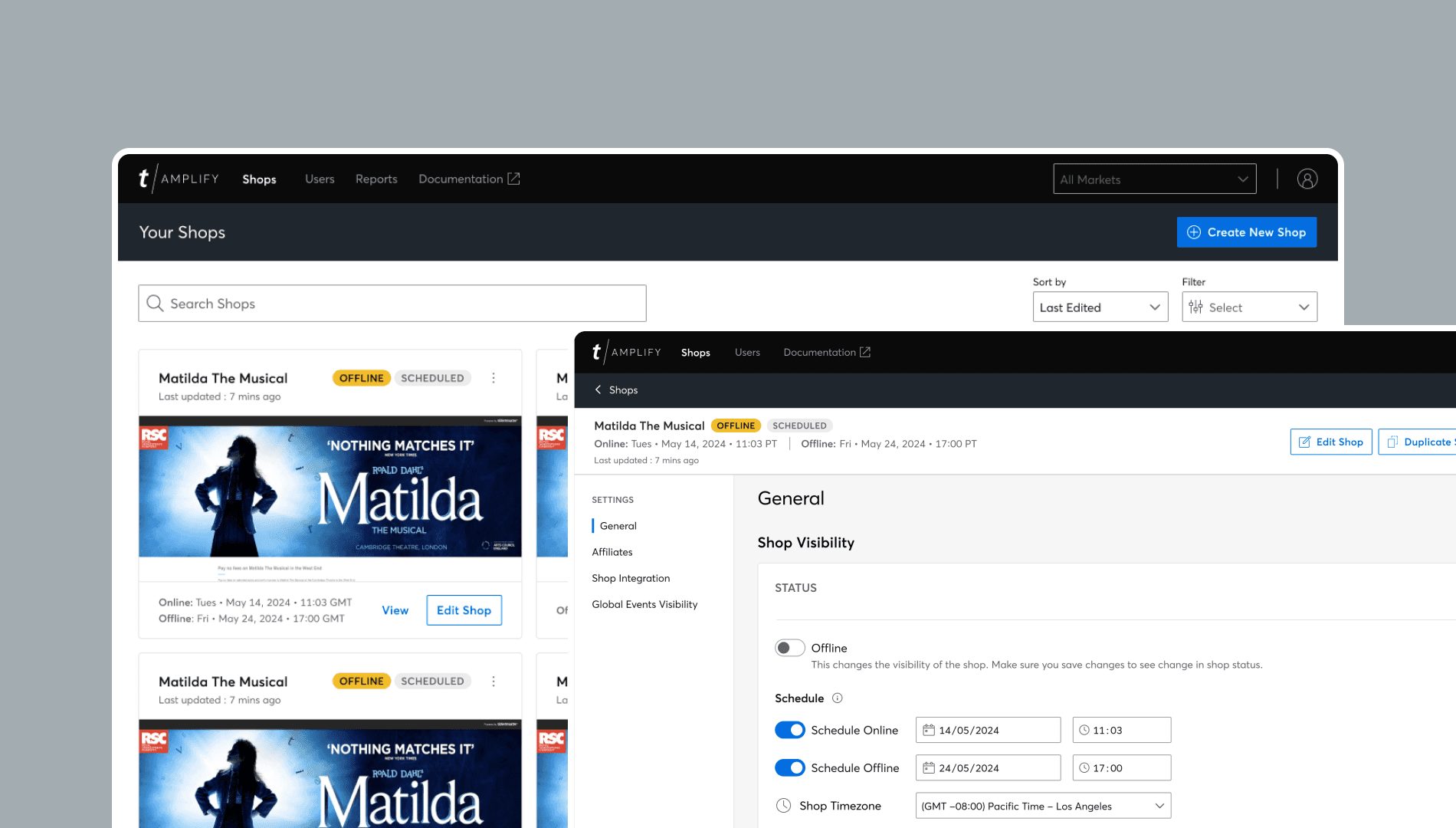
Introducing Shop Schedule
Shop State Management is a tool built within Amplify (Ticketmaster's Internal CMS) to let stakeholders set when splash pages go live or offline.
For this project we explored a new feature to accompany and manage the shop state visibility, called Shop Schedule. For this, I led the UX and UI design process from concept to handoff, working closely with developers to understand system limitations and behaviour.
How We Approached It
Revisit
Revert back to pervious Shop state management research and testing conducted.
Iterate
Design & iterate based on prior user pain points and newly conducted user interview and survey responses.
Validate
0
0
Stakeholders were surveyed to assess understanding, dependencies and consolidate feedback.
Where It Started
How We Researched It
A general Amplify user test was conducted in 2023, which assessed all three of Amplify's key screens: Shop, Admin & Customiser.
Under Shop listings, a user stated that they would like a way to automatically turn shops offline. This was a valid point, as most Amplify users typically leave their shop online even after an event sale has passed, which can make the admin appear disorganised.
As a result, I raised this with the Product team and we all agreed to work on this new initiative.
The goal was to empathise with users and alleviate their user issues. So we took on the task to quantify whether other users had the same sentiments about shop visibility, to gather enough evidence that supports the need to introducing a new feature called ‘Shop Scheduling’.

How We Researched It
Undergoing competitor analysis of other CMS platforms that adopt a similar feature. I also produced user flows, prototypes, and final high-fidelity designs, ensuring clear visibility of scheduling states.
Conducting moderated interviews with key stakeholders to gauge their current needs and frustrations with shop management.
Collaborating with the Project Manager, Development team and Design team to review and test design concepts and functionality.
Out of the 15 users we surveyed…
75%
don't turn shops offline after event has passed.
75%
would benefit from a shop schedule to instantly go online/offline.
We asked stakeholders, what does ‘shop scheduling’ mean to them?
User 1
‘Pre-setting the time you want your shop to go online or offline so you don't have to do it manually’
User 2
‘Once the events have passed, I think the page should automatically cease.’
User 3
‘It would be practical to be able to set a date to switch to offline after a presale or an onsale that is not valid anymore.’
From Problem to Prototype
Problem Framing
Aligned with product and stakeholders to understand current scheduling pain points, constraints, and operational goals.
User Insight
Spoke directly with internal users to understand real workflows, friction points, and edge cases.
Journey Mapping
Mapped the current CMS flow to identify inefficiencies, dependencies, and opportunities to simplify control.
Ideation & Wireframing
Explored low fidelity concepts in Figma, focusing on clarity, hierarchy, and reducing cognitive load.
Prototype & Validate
Created interactive prototypes and gathered feedback from key stakeholders to pressure test usability.
Iterate & Deliver
Refined flows based on feedback, aligned with engineering on feasibility, and delivered dev-ready UI.
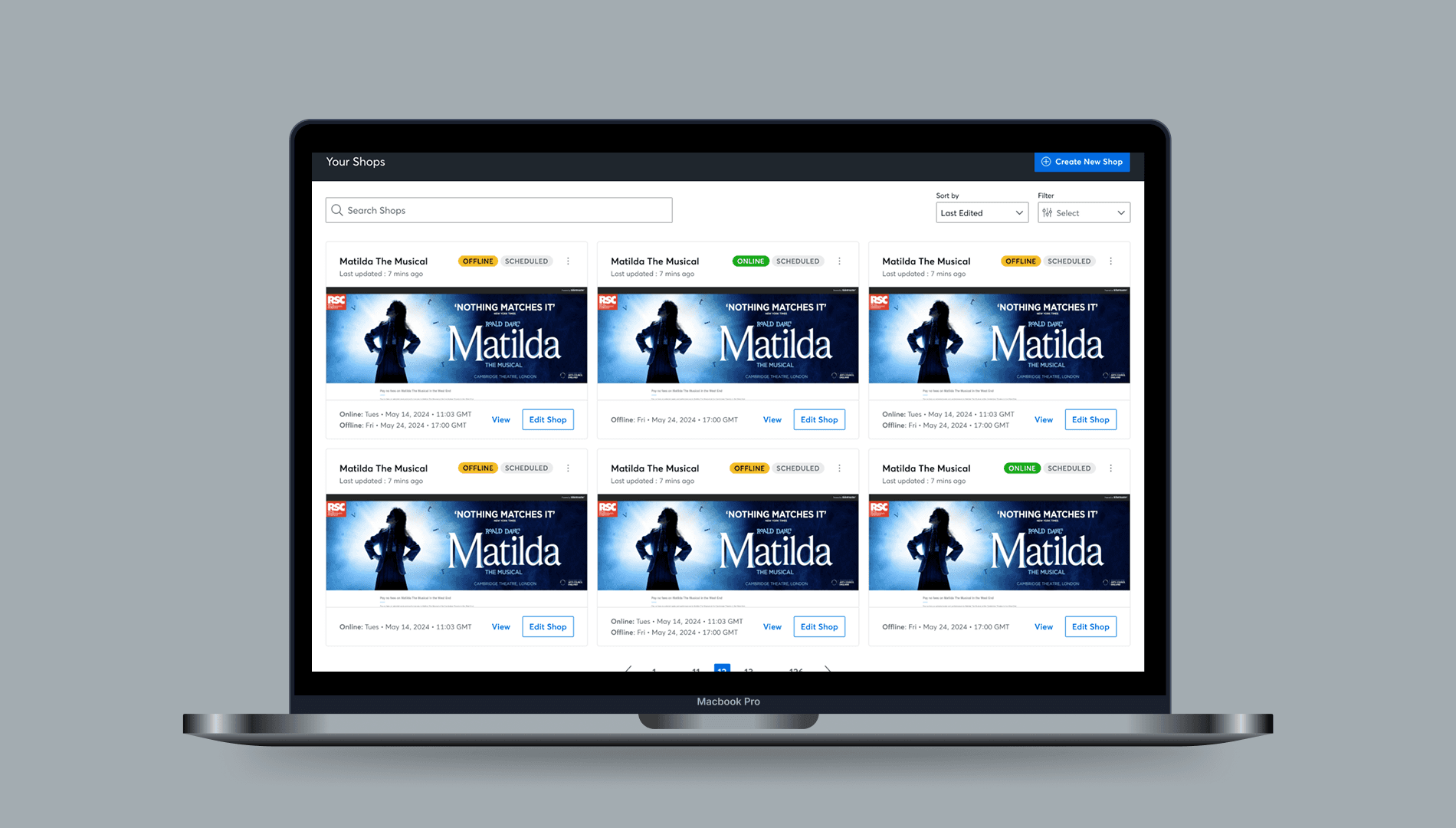
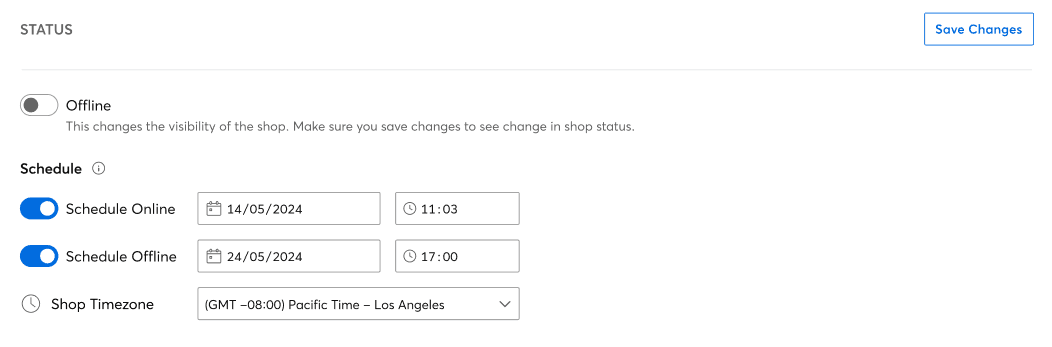
Below is a mockup of the shop schedule tool, in the form of a dashboard shop card and function within shop settings:
How We Researched It
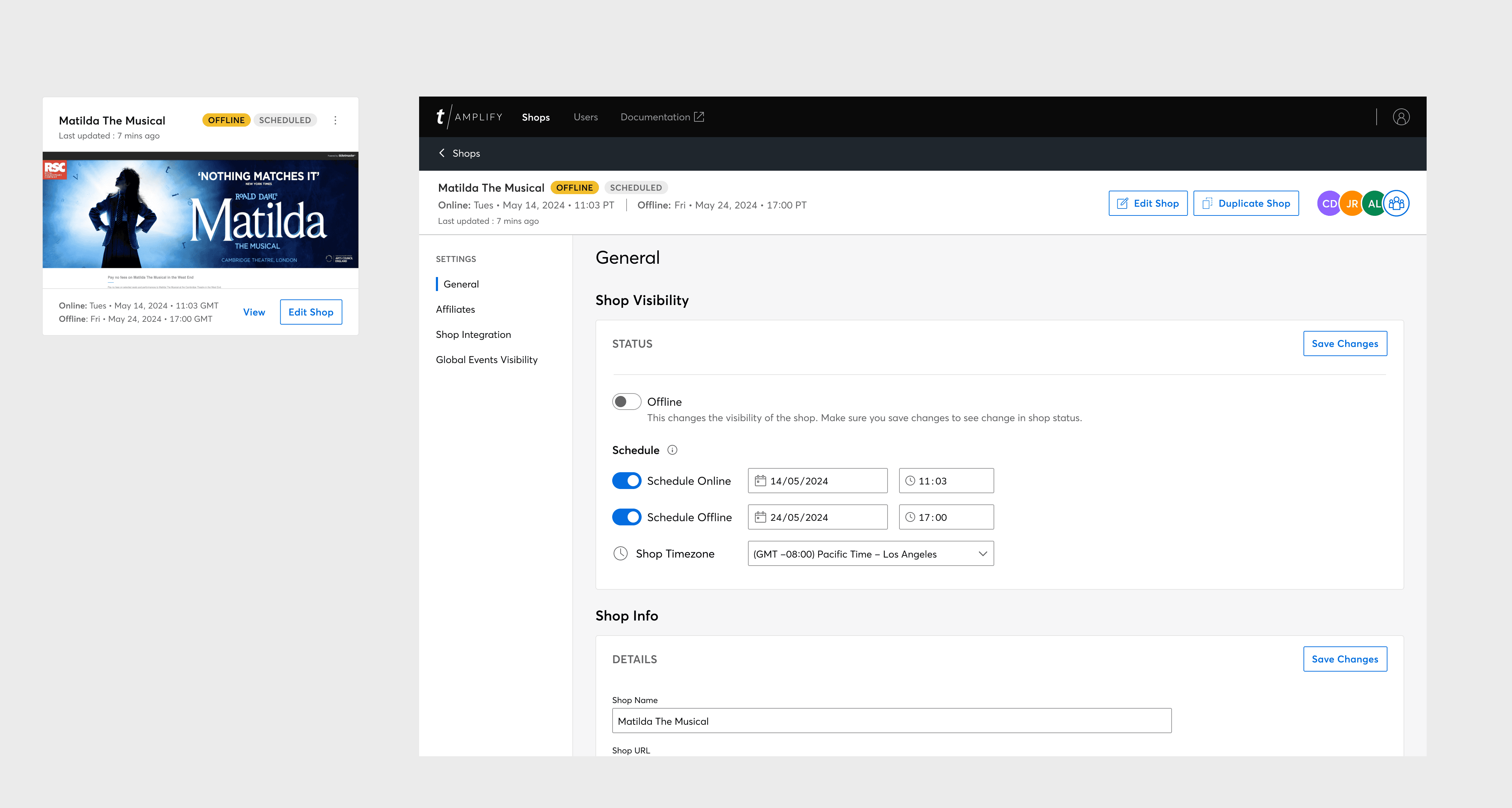
Use Cases to consider:
1
Amplify shop is offline indefinitely. Shop is not viewable to fans.
2
Amplify shop is online indefinitely. Shop is viewable to fans.
3
Amplify shop is scheduled online and offline.
4
Amplify shop is offline, scheduled to go online soon.
5
Amplify shop is online, scheduled to go offline soon.
Skills & Tools used
Wireframing
Prototyping
User testing
Figma
Zeplin
Jira
Before: Previous concept designed with limited functionality and thorough testing.
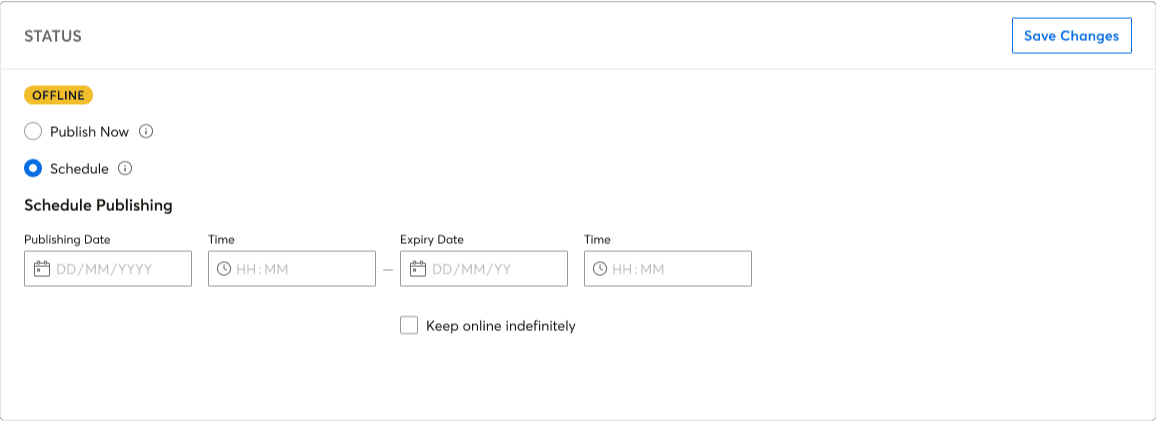
After: An enhanced design and prototype, supporting new stakeholder insights and use cases.
Balancing Clarity with Complexity
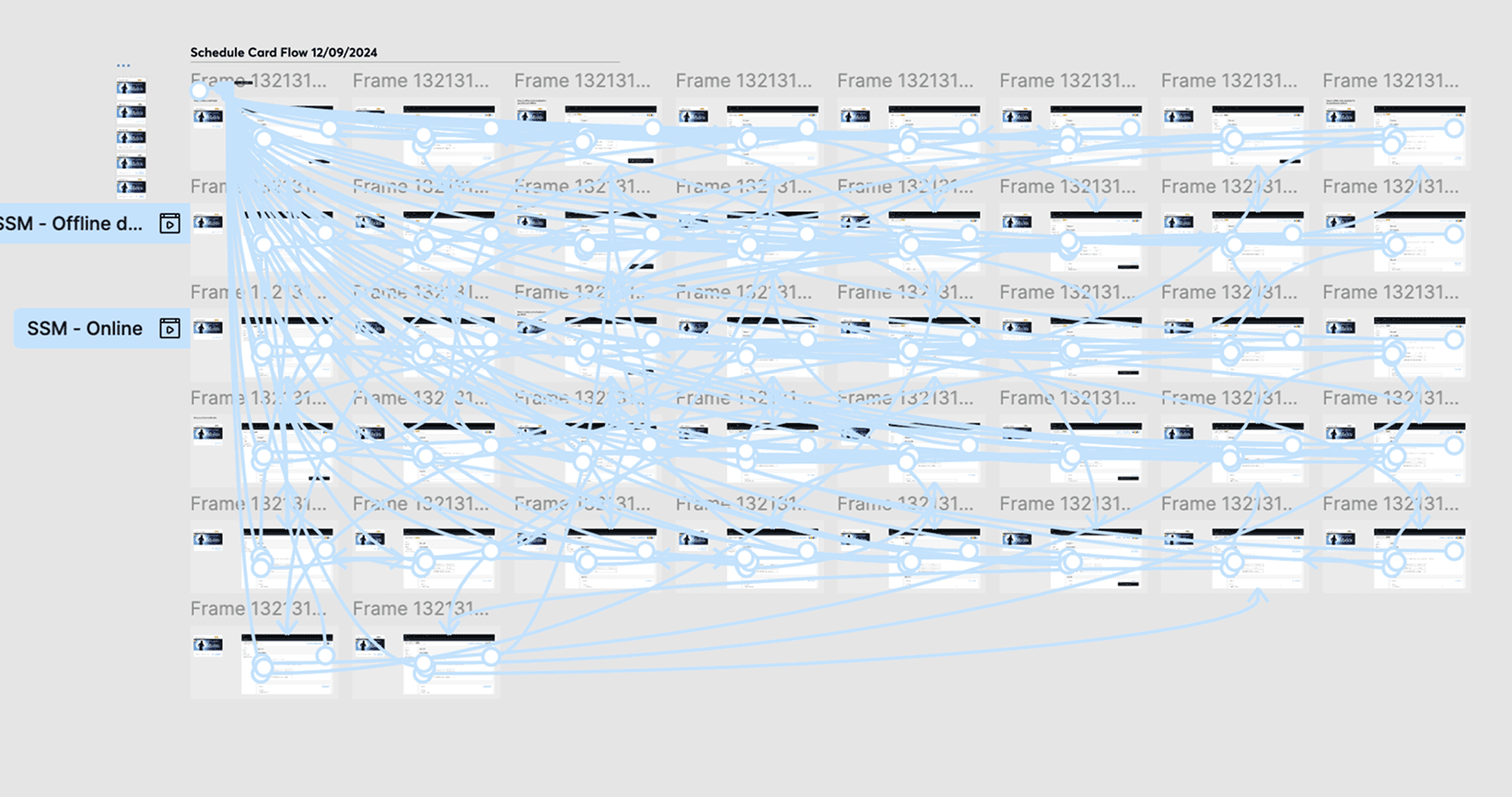
One of the main challenges was balancing the visual consistency with the requirement to display key feature info and functionality. To test its functionality and interactions, I built a complex prototype, which you'll see in the screenshot below. It was intended to both consider and map out all potential use cases/ feature interactions, aswell as a way to translate it the engineering team.
I required extensive user testing and iteration to make sure it worked correctly and packaged neatly for dev hand-off
Here is the new shop schedule in action!
Performance Efficiency Gain Across 100+ Users
Before this feature, internal teams had to manually publish pages at specific times, creating inefficiencies and coordination headaches. The new scheduling feature improved publishing control and efficiency for over 100 internal stakeholders globally. It reduced manual workload, increased reliability in launch timings, and became a core part of Ticketmaster’s CMS toolkit.
What This Project Taught Me
Impact of Internal Tools
Designing for internal users showed me how small workflow improvements can significantly reduce friction and manual effort at scale.
Simplicity Over Complexity
I learned how to strip back complex functionality into a clear and approachable interface for non technical users.
Design and Engineering Collab
Close collaboration with developers helped me better understand system behaviour and design with implementation in mind.
This is just a snapshot of the entire design process. Reach out for the full story!
More Projects
UI / UX Design
B2B Internal CMS Scheduler
Designed an internal CMS feature that lets stakeholders easily schedule and manage pages, boosting operational efficiency across global teams.
Year :
2024
Industry :
Entertainment
Client :
Ticketmaster
Project Duration :
1 month
Team:
Designer (Me) , 3 Developers , 2 Ideated with
Introducing Shop Schedule
Shop State Management is a tool built within Amplify (Ticketmaster's Internal CMS) to let stakeholders set when splash pages go live or offline.
For this project we explored a new feature to accompany and manage the shop state visibility, called Shop Schedule. For this, I led the UX and UI design process from concept to handoff, working closely with developers to understand system limitations and behaviour.
How We Approached It
Revisit
Revert back to pervious Shop state management research and testing conducted.
Iterate
Design & iterate based on prior user pain points and newly conducted user interview and survey responses.
Validate
0
0
Stakeholders were surveyed to assess understanding, dependencies and consolidate feedback.
Where It Started
How We Researched It
A general Amplify user test was conducted in 2023, which assessed all three of Amplify's key screens: Shop, Admin & Customiser.
Under Shop listings, a user stated that they would like a way to automatically turn shops offline. This was a valid point, as most Amplify users typically leave their shop online even after an event sale has passed, which can make the admin appear disorganised.
As a result, I raised this with the Product team and we all agreed to work on this new initiative.
The goal was to empathise with users and alleviate their user issues. So we took on the task to quantify whether other users had the same sentiments about shop visibility, to gather enough evidence that supports the need to introducing a new feature called ‘Shop Scheduling’.
How We Researched It
Undergoing competitor analysis of other CMS platforms that adopt a similar feature. I also produced user flows, prototypes, and final high-fidelity designs, ensuring clear visibility of scheduling states.
Conducting moderated interviews with key stakeholders to gauge their current needs and frustrations with shop management.
Collaborating with the Project Manager, Development team and Design team to review and test design concepts and functionality.
Out of the 15 users we surveyed…
75%
don't turn shops offline after event has passed.
75%
would benefit from a shop schedule to instantly go online/offline.
We asked stakeholders, what does ‘shop scheduling’ mean to them?
User 1
‘Pre-setting the time you want your shop to go online or offline so you don't have to do it manually’
User 2
‘Once the events have passed, I think the page should automatically cease.’
User 3
‘It would be practical to be able to set a date to switch to offline after a presale or an onsale that is not valid anymore.’
From Problem to Prototype
Problem Framing
Aligned with product and stakeholders to understand current scheduling pain points, constraints, and operational goals.
User Insight
Spoke directly with internal users to understand real workflows, friction points, and edge cases.
Journey Mapping
Mapped the current CMS flow to identify inefficiencies, dependencies, and opportunities to simplify control.
Ideation & Wireframing
Explored low fidelity concepts in Figma, focusing on clarity, hierarchy, and reducing cognitive load.
Prototype & Validate
Created interactive prototypes and gathered feedback from key stakeholders to pressure test usability.
Iterate & Deliver
Refined flows based on feedback, aligned with engineering on feasibility, and delivered dev-ready UI.
Below is a mockup of the shop schedule tool, in the form of a dashboard shop card and function within shop settings:
How We Researched It
Use Cases to consider:
1
Amplify shop is offline indefinitely. Shop is not viewable to fans.
2
Amplify shop is online indefinitely. Shop is viewable to fans.
3
Amplify shop is scheduled online and offline.
4
Amplify shop is offline, scheduled to go online soon.
5
Amplify shop is online, scheduled to go offline soon.
Skills & Tools used
Wireframing
Prototyping
User testing
Figma
Zeplin
Jira
Before: Previous concept designed with limited functionality and thorough testing.
After: An enhanced design and prototype, supporting new stakeholder insights and use cases.
Balancing Clarity with Complexity
One of the main challenges was balancing the visual consistency with the requirement to display key feature info and functionality. To test its functionality and interactions, I built a complex prototype, which you'll see in the screenshot below. It was intended to both consider and map out all potential use cases/ feature interactions, aswell as a way to translate it the engineering team.
I required extensive user testing and iteration to make sure it worked correctly and packaged neatly for dev hand-off
Here is the new shop schedule in action!
Performance Efficiency Gain Across 100+ Users
Before this feature, internal teams had to manually publish pages at specific times, creating inefficiencies and coordination headaches. The new scheduling feature improved publishing control and efficiency for over 100 internal stakeholders globally. It reduced manual workload, increased reliability in launch timings, and became a core part of Ticketmaster’s CMS toolkit.
What This Project Taught Me
Impact of Internal Tools
Designing for internal users showed me how small workflow improvements can significantly reduce friction and manual effort at scale.
Simplicity Over Complexity
I learned how to strip back complex functionality into a clear and approachable interface for non technical users.
Design and Engineering Collab
Close collaboration with developers helped me better understand system behaviour and design with implementation in mind.
This is just a snapshot of the entire design process. Reach out for the full story!
More Projects
UI / UX Design
B2B Internal CMS Scheduler
Designed an internal CMS feature that lets stakeholders easily schedule and manage pages, boosting operational efficiency across global teams.
Year :
2024
Industry :
Entertainment
Client :
Ticketmaster
Project Duration :
1 month
Team:
Designer (Me) , 3 Developers , 2 Ideated with
Introducing Shop Schedule
Shop State Management is a tool built within Amplify (Ticketmaster's Internal CMS) to let stakeholders set when splash pages go live or offline.
For this project we explored a new feature to accompany and manage the shop state visibility, called Shop Schedule. For this, I led the UX and UI design process from concept to handoff, working closely with developers to understand system limitations and behaviour.
How We Approached It
Revisit
Revert back to pervious Shop state management research and testing conducted.
Iterate
Design & iterate based on prior user pain points and newly conducted user interview and survey responses.
Validate
0
0
Stakeholders were surveyed to assess understanding, dependencies and consolidate feedback.
Where It Started
How We Researched It
A general Amplify user test was conducted in 2023, which assessed all three of Amplify's key screens: Shop, Admin & Customiser.
Under Shop listings, a user stated that they would like a way to automatically turn shops offline. This was a valid point, as most Amplify users typically leave their shop online even after an event sale has passed, which can make the admin appear disorganised.
As a result, I raised this with the Product team and we all agreed to work on this new initiative.
The goal was to empathise with users and alleviate their user issues. So we took on the task to quantify whether other users had the same sentiments about shop visibility, to gather enough evidence that supports the need to introducing a new feature called ‘Shop Scheduling’.
How We Researched It
Undergoing competitor analysis of other CMS platforms that adopt a similar feature. I also produced user flows, prototypes, and final high-fidelity designs, ensuring clear visibility of scheduling states.
Conducting moderated interviews with key stakeholders to gauge their current needs and frustrations with shop management.
Collaborating with the Project Manager, Development team and Design team to review and test design concepts and functionality.
Out of the 15 users we surveyed…
75%
don't turn shops offline after event has passed.
75%
would benefit from a shop schedule to instantly go online/offline.
We asked stakeholders, what does ‘shop scheduling’ mean to them?
User 1
‘Pre-setting the time you want your shop to go online or offline so you don't have to do it manually’
User 2
‘Once the events have passed, I think the page should automatically cease.’
User 3
‘It would be practical to be able to set a date to switch to offline after a presale or an onsale that is not valid anymore.’
From Problem to Prototype
Problem Framing
Aligned with product and stakeholders to understand current scheduling pain points, constraints, and operational goals.
User Insight
Spoke directly with internal users to understand real workflows, friction points, and edge cases.
Journey Mapping
Mapped the current CMS flow to identify inefficiencies, dependencies, and opportunities to simplify control.
Ideation & Wireframing
Explored low fidelity concepts in Figma, focusing on clarity, hierarchy, and reducing cognitive load.
Prototype & Validate
Created interactive prototypes and gathered feedback from key stakeholders to pressure test usability.
Iterate & Deliver
Refined flows based on feedback, aligned with engineering on feasibility, and delivered dev-ready UI.
Below is a mockup of the shop schedule tool, in the form of a dashboard shop card and function within shop settings:
How We Researched It
Use Cases to consider:
1
Amplify shop is offline indefinitely. Shop is not viewable to fans.
2
Amplify shop is online indefinitely. Shop is viewable to fans.
3
Amplify shop is scheduled online and offline.
4
Amplify shop is offline, scheduled to go online soon.
5
Amplify shop is online, scheduled to go offline soon.
Skills & Tools used
Wireframing
Prototyping
User testing
Figma
Zeplin
Jira
Before: Previous concept designed with limited functionality and thorough testing.
After: An enhanced design and prototype, supporting new stakeholder insights and use cases.
Balancing Clarity with Complexity
One of the main challenges was balancing the visual consistency with the requirement to display key feature info and functionality. To test its functionality and interactions, I built a complex prototype, which you'll see in the screenshot below. It was intended to both consider and map out all potential use cases/ feature interactions, aswell as a way to translate it the engineering team.
I required extensive user testing and iteration to make sure it worked correctly and packaged neatly for dev hand-off
Here is the new shop schedule in action!
Performance Efficiency Gain Across 100+ Users
Before this feature, internal teams had to manually publish pages at specific times, creating inefficiencies and coordination headaches. The new scheduling feature improved publishing control and efficiency for over 100 internal stakeholders globally. It reduced manual workload, increased reliability in launch timings, and became a core part of Ticketmaster’s CMS toolkit.
What This Project Taught Me
Impact of Internal Tools
Designing for internal users showed me how small workflow improvements can significantly reduce friction and manual effort at scale.
Simplicity Over Complexity
I learned how to strip back complex functionality into a clear and approachable interface for non technical users.
Design and Engineering Collab
Close collaboration with developers helped me better understand system behaviour and design with implementation in mind.
This is just a snapshot of the entire design process. Reach out for the full story!